⚔️ War & CWL
Use the war and CWL commands in Discord to inspect a clan's wars, lineups, and Clan War League results.
View a war
Use /war search and select a clan by name or tag. To view a recorded war, optionally choose a war_end suggestion; otherwise the current war is shown.
Use the menu below the result to switch between the war overview, clan and opponent rosters, attacks, defenses, and opponent information. You can refresh the result or open the war in the app.
View war preferences
Use /war preference and select a clan to see members grouped by whether they are opted in or out. The menu can show the last preference change, last war, or war timer when recorded data is available. Unavailable data is shown separately.
View a clan's CWL
Use /cwl search and select a clan. Optionally choose a season in YYYY-MM format; otherwise the current season is used.
The menus let you choose a CWL page, round, and clan in the group. Available pages include the current and next rounds and lineups, attacks and defenses, player and clan leaderboards, missed hits, all rounds, and members. You can refresh the result or open it in the app.
The image below is an example of the CWL overview; the current layout may differ.
.png)
Compare family CWL rankings
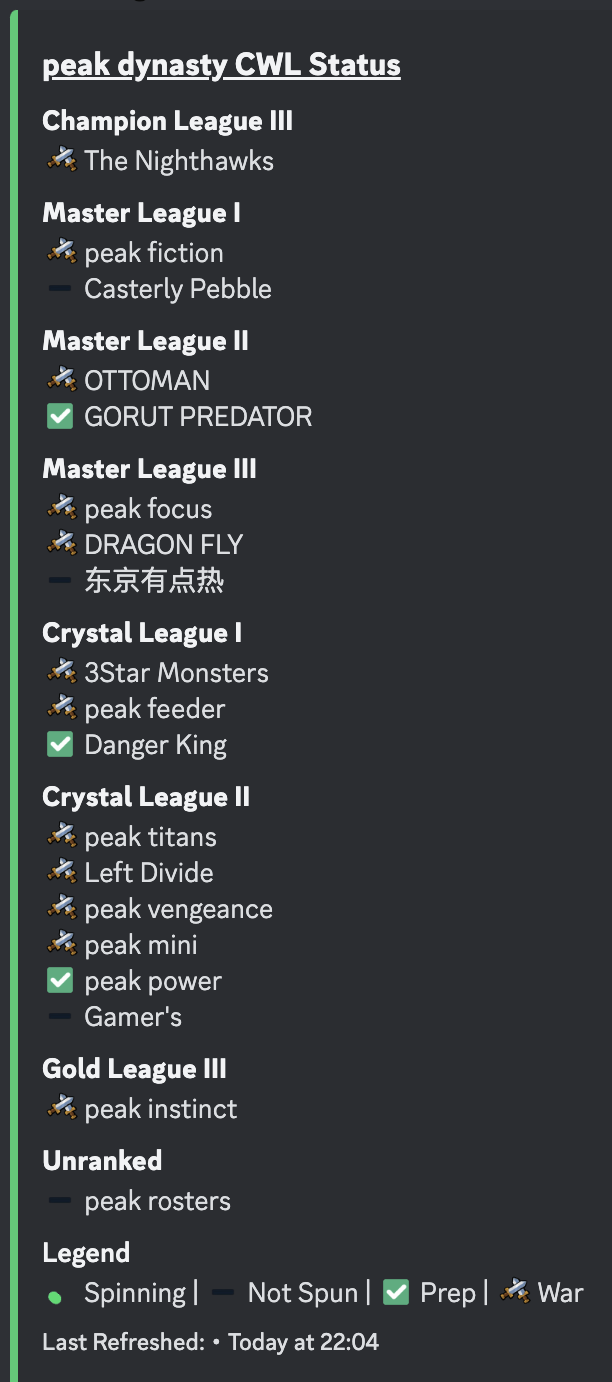
Use /cwl rankings in your Discord server to see CWL status and standings across the family clans added to that server. Optionally select a season; the default is the current season. Use the refresh button to update the report.
The following image shows an older family CWL status example; the current report may look different.
War and CWL views depend on available game and recorded data. A private war log can limit the information available for a clan.